




For nearly forty years, I have had the joy of teaching and helping learners discover new skills. These web page lessons are designed to be fun, engaging, and easy to follow, so anyone who wants to learn can feel excited and confident along the way. Each week, you will explore something new, build your knowledge step by step, and develop useful skills that can help prepare you for the jobs and opportunities of the future.
 is about creating a web page. Web pages are built using a language called HTML, which stands for Hyper Text Markup Language. HTML helps tell a web browser what to show on the page.
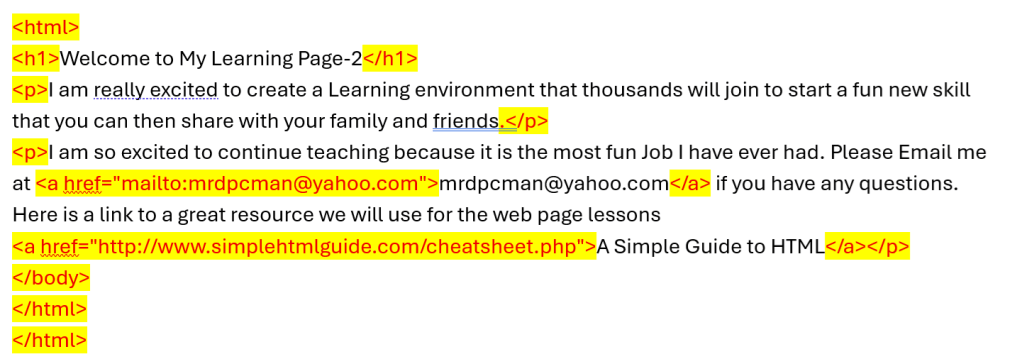
HTML uses special words called tags. A tag usually begins with the less-than symbol < and ends with the greater-than symbol >. Tags work like instructions that tell the browser how to organize and display your content.
Many tags come in pairs: an opening tag and a closing tag. For example, a paragraph begins with <p> and ends with </p>. A main heading begins with <h1> and ends with </h1>. A link begins with <a> and ends with </a>.
The link tag, <a>, is used to connect your page to another page or to another place on the same page. You will also see the <html> tag, which tells a browser such as Chrome or Firefox that the file is an HTML web page. Next, we will look at a short HTML example and see how it appears in a browser.
Try It Yourself: Create Your First Web Page
Goal: Practice using basic HTML tags to create a simple web page with a heading, a paragraph, and a link.
- Open a simple text editor such as Notepad, TextEdit, or any coding editor you like, ensuring that it is installed and ready to use for your project or task.
- Type the starter HTML code:
- <html>
<h1>My First Web Page</h1>
<p>I am learning how to build web pages with HTML.</p>
</html>
- <html>
- Change the <h1> heading to your own custom title that reflects the content or theme of your document, ensuring it captures the essence of what follows.
- Write one short Paragraph in the <p> I am learning…</p> to something about YOU enjoy learning. I have always found a deep sense of joy in the process of learning new languages and learning to fix products that have failed. The thrill of grasping the intricacies of a foreign language is unparalleled, as each new word and grammar rule opens the door to a different culture and way of thinking. Similarly, the challenge of troubleshooting and repairing malfunctioning products not only sharpens my problem-solving skills but also provides a tangible sense of achievement when I successfully restore something to working order.
- Make a new folder called My-Web on you computer
- Then save your file as my-first-page.html in the My-Web folder
- Open the file in a web browser to see your page. My-Web
- Open Firefox, click the + at the top to open a new tab
- Then on top left click FILE Word
- Then go down to Open File, then find your folder My-Web
- Then click on my-first-page.html file, and click OPEN
- Does your kind of look like this?
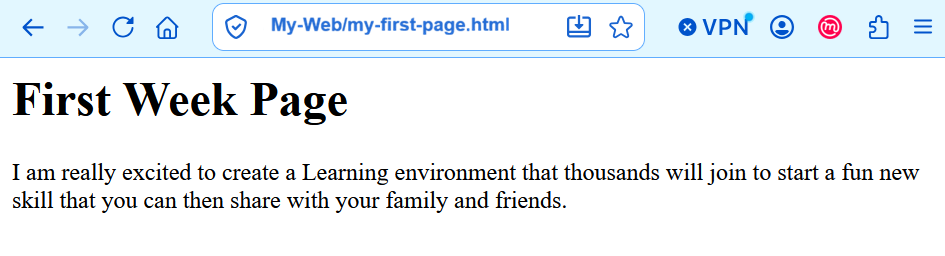
Think about it: What changed in the browser when you changed the heading or paragraph? Be ready to share what you noticed.
Challenge: Add one more paragraph that tells visitors why you are excited to learn HTML. If you are ready for an extra step, try changing the heading to something creative, such as “Welcome to My Learning Page.”
Homework 1
Have links to something YOU like and add YOUR email in there as well.
If you would like to share with me, email them to me at: MrDpcMan@yahoo.com. I would love to have a free Series for those young and old to have fun creating web pages.
I have made a little fancier page for you this time. I have made the

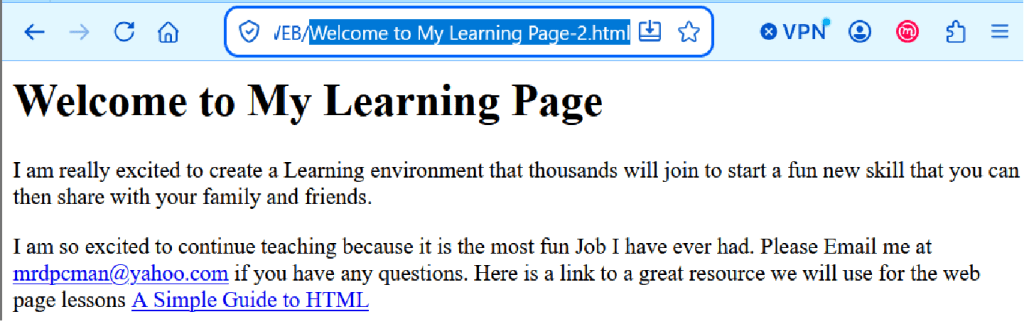
Link to my Welcome to My Learning Page-2 on my Web Site

